Search This Blog

Showing posts with label Video Call. Show all posts

Thursday, August 18, 2011

Google Talk video with Android 2.3.4 Gingerbread


Google Talk video with Android 2.3.4 Gingerbread


Google Talk Video Chatting For Android ( Video Chat Invitation ) Now available on Samsung galaxy s2.
With The New Android Version Gingerbread ,that upgrade to Android 2.3.4 that'll bring video calling to Gtalk ( video call ability )
AndroidHD tested for you the quality between a computer and a Nexus s.
Inside the test were performed in WIFI and outdoor the test was in 3G.

With Google Talk, you can now video or voice chat with your friends, family and colleagues right from your Android phone, whether they're on their compatible Android tablet or phone, or using Gmail with Google Talk on their computer. You can make calls over a 3G or 4G data network (if your carrier supports it) to stay connected while you're on the go, or over Wi-Fi.

Google Talk with video and voice chat will gradually roll out to Nexus S devices in the next few weeks as part of the Android 2.3.4 over-the-air update and will be launching on other Android 2.3+ devices in the future.

Avec Google Talk, vous pouvez maintenant la vidéo ou le chat vocal avec vos amis, famille et collègues à partir de votre téléphone Android ( visioconférence) , qu'ils soient sur ​​leur tablette Android compatible ou par téléphone, ou d'utiliser Gmail avec Google Talk sur leur ordinateur. Vous pouvez faire des appels sur un réseau 3G ou 4G de données (si votre opérateur prend en charge) pour rester connecté pendant que vous êtes en déplacement ou en Wi-Fi.

Google Talk avec la vidéo et le chat vocal sera progressivement déployé dans d'appareils Nexus S dans les prochaines semaines dans le cadre de la mise à jour 2.3.4 Android sur les ondes et sera lancé sur d'autres appareils Android 2.3 + à l'avenir. ( samsung galaxy sII)

Et un merci particulier pour Hypnozprod pour le son
si vous souhaitez le contacter :
Mail : hypnozprod@gmail.com
Facebook : Florent Hypnoz
Web Site : http://www.hypnozprod.com/


Thursday, August 11, 2011

How to make video via Facebook Video Call

How to make video via Facebook Video Call


Earlier today, Facebook teamed up with Skype to launch video calling right within Facebook.
Facebook is trying to beat back a challenge from Google, which began beta-testing its own social video chat feature, Google+ Hangouts, last week.
The Facebook-Skype calls are one to one only, while Hangouts supports up to 10 people.
But Facebook has two big advantages. First -- and most important -- a lot of your friends are already on the service. Facebook has 750 million users. Google+ isn't even open to the public yet.
Second, Facebook claims the feature is so easy to use, even the least technical people on Facebook should be able to figure it out fast.
We checked it out for ourselves, and they're not lying. Here's how you do it.

Monday, May 16, 2011

Microsoft's takeover Skype

Microsoft's  takeover Skype

Industry questions whether software giant is overpaying for Internet telephony provider.
 

Microsoft plans to take over Internet telephony specialist Skype in a multi-billion-dollar deal that could be confirmed later today, it emerged on Tuesday.

The software giant will pay a staggering US$7 billion-$8 billion for Skype, according to the Wall Street Journal which broke the story citing “people familiar with the matter”. Microsoft and Skype have yet to comment on the report.
Despite the initial shock from the industry – Skype was widely tipped as a takeover target but Microsoft had previously not been named as a likely buyer – the logic of the deal quickly became evident: Microsoft will be able to integrate Skype's Internet calling service into a number of its product lines. However, eyebrows were raised over the price of the deal, which does not seem to reflect Skype's recent struggles to monetise its business.
Skype posted a net loss of $7 million in 2010 on revenues of $860 million, although admittedly those numbers were an improvement on 2009, when it reported a $418 million loss and revenues of $719 million. The company has a strong subscriber base: its registered users number 663 million. However, the problem is that many of those customers use Skype's free services. Its paying customers are growing, but at the end of last year average monthly paying users stood at just 8.8 million.

For Microsoft the synergies are clear. Integrating Skype into its gaming systems, Xbox 360 and Kinect, will give it an extra dimension, while bringing Skype and Microsoft's Office software together could facilitate new collaboration tools. The situation in the mobile space is less clear. Doubtless Microsoft could incorporate Skype into its Windows Phone operating system, but there are doubts over whether mobile service provider customers would be in favour of that.

Is that extra dimension really worth as much as $8.5 billion – the deal also includes the assumption of $686 million in debt – to Microsoft?

If the deal goes ahead as outlined it will certainly be good news to one company.
Skype's former parent and existing 30% shareholder eBay stands to make money from the transaction, which is something of a turnaround given that its

Thursday, May 12, 2011

Test - iPAD 2 FACETIME

Test - iPAD 2 FACETIME

T-Mobile myTouch 4G "Piggyback"

T-Mobile myTouch 4G "Piggyback"

Tuesday, April 19, 2011

Easy video call on Facebook

Easy video call on Facebook


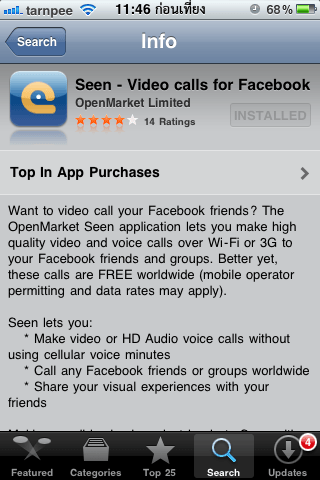
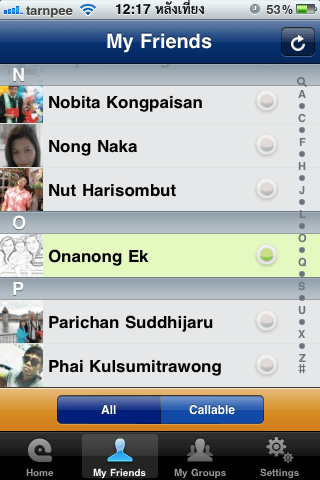
Seen is the application available for families who use facebook and i have installed only seen together.
As far as trial over wifi and 3G voice and video so well can not believe that's free and it has a good model.
The use of sound through the edge ais is the lack of any knowledge, but not good enough.

- For those who have friends on facebook and do not want to distribute telephone.
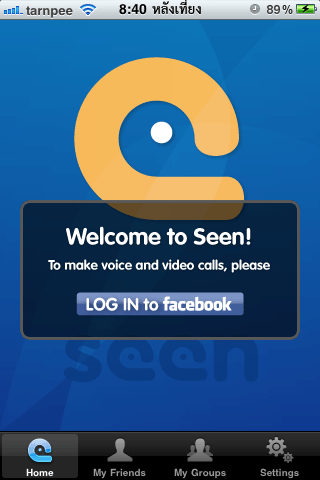
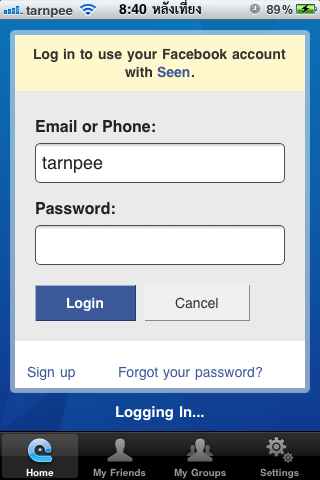
- Log in with a facebook account.
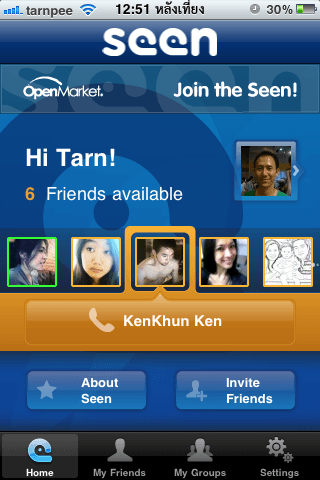
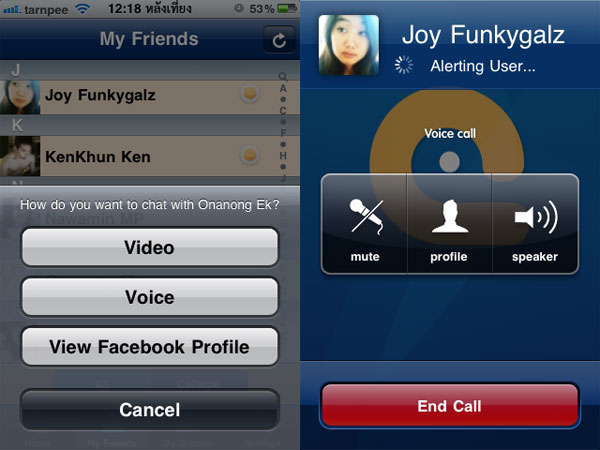
- To call each other by voice. Like a telephone.
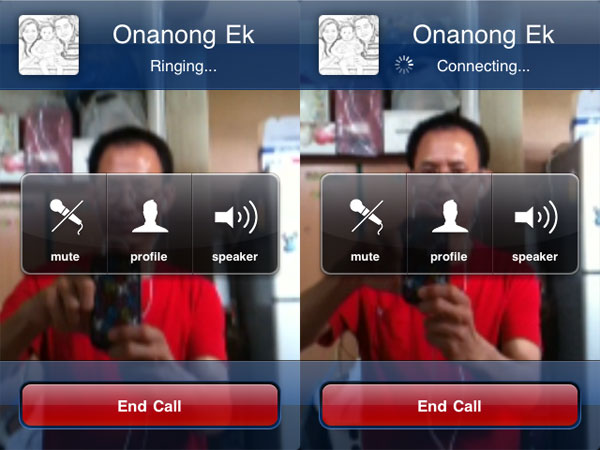
- Talk face to face the eye called the video call or facetime.
- Sound and picture quality. Depending on the speed of the internet wifi or 3G.
- The edge is too slow to talk, especially to know Ernืng edge label true.
- If you do not log out when a friend calls up a pop up notice to accept or not.

- Only iPhone 3Gs, iPhone4, iPod Touch4, iPad 2 in addition to all this all right.
- Need iOs 4.1 or above.
- All seen that you Download and use free of charge with no conditions.


Step by Step to install


Monday, April 18, 2011

Airtel 3g New Video Calling Ad

Airtel 3g New Video Calling Ad

Sunday, April 17, 2011

How to make video call via Nokia N8

How to make video call via Nokia N8

Nokia in today's world is defined as a best in mobile industry. Because of its new techniques, innovations and developments it has captured millions of hearts for it. Not only it is popular in India but around the world it has gained the topmost position in the mobile industry.The new invention done by the research team of nokia corporation is the latest Nokia n8.There are so many updations that has been done in nokia n8 but the best feature of this phone that makes it the best nokia n8is 12 megapixel camera with carl-zeiss lens which claims to capture high definition images and 720p seamless videos with zenonflash.


For those people who love clicking photos will love this phone because of this feature.This version is the powerpack of latest features and magnificent looks that will tempt people to buy nokia n8.Just like its tagline connecting people it has connected a relationship with people.Nokia n8 simfreephone solves the purpose of those travellers who on business purpose travel to abroad and they have now the independence to choose that particular country's sim card and have an unlimited time of talking to their close ones or their clients as this handset is not to tied to any kind of network and can be used with almost all simcards.Nokia n8 deals offersa plenty of benefits to the users as they offer cash back benefits,free minutes of talk time,free text messages ,free connections or free line rental that has reduces line rental too.Nokia n8deals provide many surprising applications like Dolby Digital Plus via HDMI,digitalcompass,video/phone editor,FlashLite v4.0,Anodized aluminium casing,document viewer(word excel,powerpoint,pdf),T9,TV-out(720p video)via HDMI and composite and voice command/dial.


Cheap nokia n8 contract offersare provided by various network providers like Vodafone,orange,02,Three,T-mobile and Virgin.Nokia n8 best deals provide you lots of free rewards including Nintendo games,psp,xbox,laptops,lcdtv,automatic cash back.freedownloading,unlimited text messages,reduced call rates and further more.Its a must buy handset as you get nokia n8 bestdeals offered. One can also attain a freedom from most expensive plans offered on handsets and can be tension free by utilizing and availing the advantages on nokia n8 deals uk offered as these deals provide a reasonable and affordable tariff plans suiting to your needs and also provides the mobile phone at least expensive prices suiting to your budgets.The dealers of nokia provide you so many offers within which you have to choose which are the best offers on nokia n8available with your preferred minutes, contract length and even free gifts. There is also a trend which nokia n8 is following that is of nokia n8 12 month line rentalwhich provides a plan matching your requirements like of free talk time or messaging and many more.So all we conclude is that nokia is a must buy handset.

Example Video


IP Telephony - Ways To Make Calls For Free

IP Telephony - Ways To Make Calls For Free

The internet is a very useful tool. It can be used for many things, and one of those things is the telephone. The telephone is one of our basic needs and that is to communicate. Technology has made our world easier and such has become integrated in every part of our lives. The future is now walking towards the IP telephony.


The information or the voice, is sent over the data network. It is reduced down into packets that are sent through the lines to a server and thus the internet. The web serves many functions, now it can serve something that is more basic, the phone.

The IP telephony is cheap and can be purchased by anyone. Another advantage, is that the internet service can be used for more than just one function. This allows for a better budget, something that is important in today's economy.
Another advantage of the IP telephony is that it can have multiple services. Services such as faxing, and other items can be added onto the phone. The service is also clear and reliable.
VoIP can also be used on the cell hone as well. This allows for VoIP to be used on other devices. The advantage of everyone being connected is that it will help to make society better. A basic function can be provided because it is now affordable for everyone. The advantage for the government is that their citizens are better connected and the flow of information is quicker.

The need for a telephone is enormous considering the complex nature of our society. It has become a basic need and such, should be in every home. With the use of the internet, this can be possible. Thanks to the internet and VoIP services


Friday, April 15, 2011

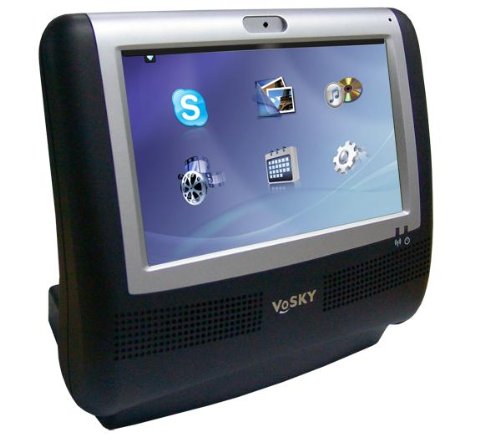
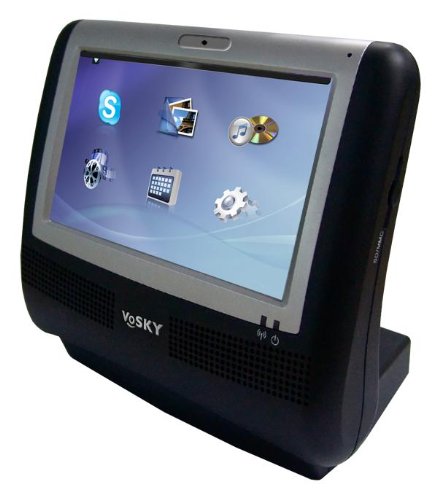
VoSKY Touch Videophone for Skype Preview

VoSKY Touch Videophone for Skype Preview


Why the VoSKY Video Touch Phone for Skype?
* Powerful and Seamless - enjoy smooth and clear fullscreen video calls
* Stand-Alone Device - No need to download software, configure webcam, microphone, or speakers, or deal with competing programs that may interfere with video/audio quality
* Always On - VoSKY Video Touch Phone is always ready to make or take a call
* User-Centric Design - intuitive touchscreen controls makes it easy for anyone to use
* Connect to Online Services - supports custom media content, including FrameChannel and SHOUTcast™ Radio
* Standards Compatible - supports full spectrum of audio, video, and photo media file types
* Flexible and Functional - deploys easily in either home or office networks via Ethernet or Wi-Fi

What's in the box?

* VoSKY Video Touch Phone for Skype
* Power adapter
* Quick start guide
* RJ-45 CAT5e Ethernet cable

VoSKY Multimedia Touch VideoPhone (MTV) Review 1


VoSKY Multimedia Touch VideoPhone (MTV) Review 2


VoSKY Multimedia Touch VideoPhone Review 3


Wednesday, April 13, 2011

How to Record Skype Video Conference

Skype is one of the most popular free ways to chat, talk and video conference around the world. The video conferencing function is becoming more and more common as access to webcams and high-speed Internet has improved. But how to record a Skype video conference for later reference? There are two ways to do it, and both involve installing a free Skype plugin. In fact, it is surprisingly easy.

Instructions

1. Launch Skype and log in. You cannot install the required video conference recording plugin while offline. Set your status to "Invisible" if you wish not to be disturbed while installing the plugin.

 2. Click "Tools," "Extras," and "Get Extras" from the top menu bar in Skype. This opens the Extras Manager

 3. Type "record video" in the search box in the Extras Manager. Two plugins will appear: VodBurner Video Call Recorder and Supertintin Recorder for Skype. We will use the latter plugin.

4. Click the green button next to the Supertintin plugin to install it on your computer's hard drive.

5. Follow the installation wizard, choosing all the defaults for Supertintin. Plugin installation is now complete, and no restart is necessary. From now on, every time you start Skype, Supertintin will also start up in a separate window.

6. Click the red "Record" button whenever you are on a Skype video conference to record it to your hard drive.


Monday, April 11, 2011

Free Video Conference Software for Your Business or School

Free Video Conference Software for Your Business or School


On modern technology, distance no barrier of communication. Business opportunities can be created, people can communicate freely semester can be increased significantly and the other using video conferencing. Wherever they can connect people and solve problems by using modern technology.

Free video conference software can bring people together in spite of distance, and the corporate world and education sector are the first to benefit from this facility. Video conference requires the proper facilities and software. A webcam or a video camera is necessary for video input, a television or computer monitor is used for video output, microphones or speakers are used for verbal communication and the Internet or telephone network is necessary for data transfer. Another important requirement of video conferencing is proper software. Luckily, there is open source web meeting software you can use or free video conference software.

Open source web meeting software is closely related to free video conference software. The most important detail that you have to remember is that both are free. However, there are few differences between these two types of software. By using an open source web meeting software you are also permitted to modify, improve or distribute the software. There are of course some exceptions, restrictions and rules. By using free video conference software you can run this program for any given purpose, study how it works, improve it or redistribute copies.

Most free video conference software can be considered open source web meeting software and vice versa. Therefore they are usually placed together in a combined name. However, before you choose any free video conference software or open source web meeting software there are a few things you should keep in mind.

First of all, you should take into consideration the technical abilities of the company or organization using the software. Most open source web meeting software is only applicable for small companies that have limited technical capabilities. If you have no major technical limitations, then you should look for more advanced free video conference software. The features of the software are the indicators in this case. Video conferencing, audio conferencing, file sharing, chat or file searching are some of the features you are looking for.

Second of all, most open source web meeting software can be temporary. This means that the free video conference software can be used free of charge for a given period of time. Before you decide to use free software, make sure you know what the trial period is so you do not have unpleasant surprises. You should also check the technical requirements of the free software. Most of the open source web meeting software requires a certain operating system. If you do not have it, then the software will not work.

Video conferencing facilitates communication and, through the use of good conferencing software, any aspect of a real life meeting can be covered. Free video conference software or open source web meeting software allows any company to make the best of modern technology.

Read more: http://www.articlesbase.com/laptops-articles/free-video-conference-software-for-your-business-or-school-432805.html#ixzz1JHNA5a2M

Sunday, April 10, 2011

Installation Guide VoIP Phone: ET-747 IP-Phone.

Installation Guide VoIP Phone: ET-747 IP-Phone.

IP ADDRESS:.

SIP SERVER : voip.mouthmun.com PORT : 5060 SIP SERVER: voip.mouthmun.com

PORT: 5060.
Lebenton provides the most outstanding VoIP call quality to our customers with a range of plans that givethe best value to residential and business users!! Lebenton provides the most outstanding VoIP call quality to our customers with a range of plans that givethe best value to residential and business users!!
All you have to do is purchase Lebenton ET-747 IP-Phone and sign up with our plans, and you are ready to call to your friends at amazing call rates!! All you have to do is purchase Lebenton ET-747 IP-Phone and sign up with our plans, and you are ready to call to your friends at amazing call rates!!

Hardware. 

Top: ET-747 IP Phone.


1. 7V Power: power cable plugged into the Abapter.
2. Wan: Lan cable Inter connect to the band or to log internet.
3. Status: light blinks "green," always show the transmission of data.
4. PC: attached to the PC.
 
IP Phone Package.


IP Phone ET-747/ES-747 consists of a set of (Package).

   1. Phone (Phone + Handset).
   2. Power Adaptor (Input: 100-240V, 50-60Hz, Output: +7 VDC, 800mA).
   3. Cable connection between the IP Phone to PC (Network Cable).
   4. Install Manual (User Manual)


Nature of the active (Basic Concept).


Config IP Phone On Webpage.

1. Run Internet Explorer and type the IP address bar.
- A screen to ask
      user: root
      password. : 1234

  then the screen appears as shown.
- And then set IP(To Fix IP, select Static IP, if you do not want to Fix IP, select Dynamic IP)

2. Click Advanced, and then configured as shown.
- Then Proxy Addr + SIP Domain Name + OutbndProxyAddr = voip.mouthmun.com Port 5060. 


Saturday, April 9, 2011

Video Conference Easy Start up !!

Video Conference Easy Start up !!


The First
,you have taken part in a video conference before or if you have not, there are a few basic essentials that you should know as more and more companies are leaning towards video conferencing. many people sometimes are a little bit confused as they may assume that video conferencing and video phone calls is the same thing. This assumption is actually false. Video phone calls were designed to just serve as a form of telecommunication between two people where as a video conference was designed to serve as a conference between many people at different locations.

The Second,As technology has advanced over the years, more and more companies are using a video conference in order to conduct very special and important meetings. A video conference saves these companies tons of money as well as time. With video conferencing, a company does not have to spend additional fees on travel where as in the past a large expense for companies used to be travel related in order to get employees to important meetings. Video conference is also a great resource for last minute emergency meetings for companies with several locations. This resource will allow for everyone to join in on a meeting without having to travel.

Now there are two different types of video conference systems. The first type of video conference system is a dedicated system. A dedicated system contains all of the required components of the system ll packed in to one piece of equipment. This piece of equipment is typically a console with a very high quality remote control video camera. The camera can be controlled from a distance and is capable of panning in many different directions as well as it is capable of zooming. Omni-directional microphones are connected to the system in order to transmit voices. Along with microphones televisions monitor and loud speakers may be hooked up to the system.

Finally,The other type of conferencing is the desktop system. This system is just what is sounds like as it is basically your desktop computer. Now your desktop computer will most likely have all of the components needed for a successful conference, however if your desktop computer does not have these components they may be easily added. These components basically include a microphone as well as speakers. Your monitor will be used to view the other participants as well as documents for the meeting. With a video conference you are able to attend a meeting anywhere in the world.

LinkWithin

Related Posts Plugin for WordPress, Blogger...