Search This Blog

Showing posts with label Video Call setup. Show all posts

Saturday, November 3, 2012

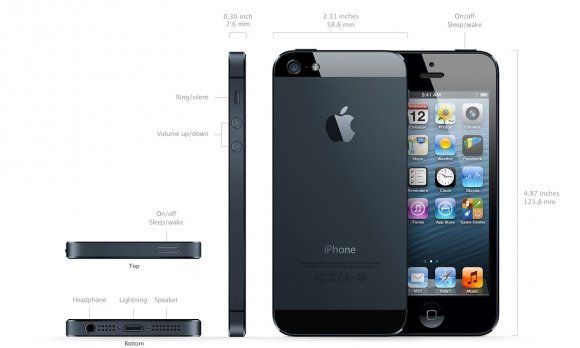
IPhone 5 video call Testing around the world

IPhone 5 Testing in many place in The World.


picture : pix-geeks.com

New IPhone 5 on sale in many country with IOS 6 OS. IPhone 5 and IPad can connect with Facetime video call,This Application had installed in Apple devices.They cann't video calling to Andriod Platform.IPhone 5

Sunday, April 10, 2011

Installation Guide VoIP Phone: ET-747 IP-Phone.

Installation Guide VoIP Phone: ET-747 IP-Phone.

IP ADDRESS:.

SIP SERVER : voip.mouthmun.com PORT : 5060 SIP SERVER: voip.mouthmun.com

PORT: 5060.
Lebenton provides the most outstanding VoIP call quality to our customers with a range of plans that givethe best value to residential and business users!! Lebenton provides the most outstanding VoIP call quality to our customers with a range of plans that givethe best value to residential and business users!!
All you have to do is purchase Lebenton ET-747 IP-Phone and sign up with our plans, and you are ready to call to your friends at amazing call rates!! All you have to do is purchase Lebenton ET-747 IP-Phone and sign up with our plans, and you are ready to call to your friends at amazing call rates!!

Hardware. 

Top: ET-747 IP Phone.


1. 7V Power: power cable plugged into the Abapter.
2. Wan: Lan cable Inter connect to the band or to log internet.
3. Status: light blinks "green," always show the transmission of data.
4. PC: attached to the PC.
 
IP Phone Package.


IP Phone ET-747/ES-747 consists of a set of (Package).

   1. Phone (Phone + Handset).
   2. Power Adaptor (Input: 100-240V, 50-60Hz, Output: +7 VDC, 800mA).
   3. Cable connection between the IP Phone to PC (Network Cable).
   4. Install Manual (User Manual)


Nature of the active (Basic Concept).


Config IP Phone On Webpage.

1. Run Internet Explorer and type the IP address bar.
- A screen to ask
      user: root
      password. : 1234

  then the screen appears as shown.
- And then set IP(To Fix IP, select Static IP, if you do not want to Fix IP, select Dynamic IP)

2. Click Advanced, and then configured as shown.
- Then Proxy Addr + SIP Domain Name + OutbndProxyAddr = voip.mouthmun.com Port 5060. 


Saturday, April 9, 2011

Video Conference Easy Start up !!

Video Conference Easy Start up !!


The First
,you have taken part in a video conference before or if you have not, there are a few basic essentials that you should know as more and more companies are leaning towards video conferencing. many people sometimes are a little bit confused as they may assume that video conferencing and video phone calls is the same thing. This assumption is actually false. Video phone calls were designed to just serve as a form of telecommunication between two people where as a video conference was designed to serve as a conference between many people at different locations.

The Second,As technology has advanced over the years, more and more companies are using a video conference in order to conduct very special and important meetings. A video conference saves these companies tons of money as well as time. With video conferencing, a company does not have to spend additional fees on travel where as in the past a large expense for companies used to be travel related in order to get employees to important meetings. Video conference is also a great resource for last minute emergency meetings for companies with several locations. This resource will allow for everyone to join in on a meeting without having to travel.

Now there are two different types of video conference systems. The first type of video conference system is a dedicated system. A dedicated system contains all of the required components of the system ll packed in to one piece of equipment. This piece of equipment is typically a console with a very high quality remote control video camera. The camera can be controlled from a distance and is capable of panning in many different directions as well as it is capable of zooming. Omni-directional microphones are connected to the system in order to transmit voices. Along with microphones televisions monitor and loud speakers may be hooked up to the system.

Finally,The other type of conferencing is the desktop system. This system is just what is sounds like as it is basically your desktop computer. Now your desktop computer will most likely have all of the components needed for a successful conference, however if your desktop computer does not have these components they may be easily added. These components basically include a microphone as well as speakers. Your monitor will be used to view the other participants as well as documents for the meeting. With a video conference you are able to attend a meeting anywhere in the world.

LinkWithin

Related Posts Plugin for WordPress, Blogger...